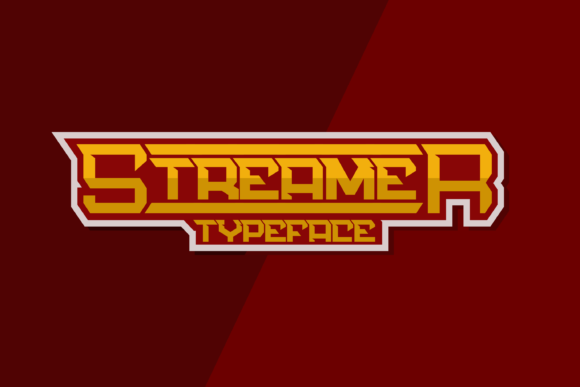
Streamer: The Bold Choice for High-Energy Design
If you are looking to inject immediate energy into a project, Streamer is not just another font; it is a statement. Designed with bold and strong letterforms, this display typeface excels in contexts where speed, sports, and raw power are the primary messages. However, simply having access to the file does not guarantee a successful design. Many creators jump straight into using heavy display fonts without considering the nuances of their application, leading to results that feel forced rather than dynamic.
Understanding what makes Streamer unique requires looking beyond its visual impact. It is PUA encoded, a technical feature that allows designers to access all glyphs and swashes with ease. While this sounds like a simple convenience, it often leads to confusion if users do not understand how to activate these special characters properly. When used correctly, the swashes add a layer of custom flair that elevates a design from generic to professional. When ignored or misused, the font can appear cluttered or technically flawed.
The Hidden Pitfalls of Display Fonts
One of the most common mistakes designers make when selecting a font like Streamer is assuming that "bold" equals "readable." There is a fine line between a powerful headline and text that is impossible to decipher at smaller sizes. Because Streamer is a display font, it is engineered for large-scale visibility. Using it for body copy or small UI elements is a critical error that ruins user experience. The thick strokes and aggressive angles lose definition when scaled down, causing readability issues that frustrate your audience.
Another frequent oversight involves the handling of ligatures and swashes. Since the font is PUA encoded, the special characters are not always visible in standard font menus. Users often miss out on the unique stylistic alternatives that give the font its personality. Instead of the standard "S," they might be stuck with a basic glyph because they haven't configured their software to recognize the Private Use Area codes. This oversight results in designs that look incomplete, missing the very details that justify choosing this specific typeface over a competitor.
- Misjudging Scale: Using the font for paragraphs instead of headlines creates visual noise.
- Ignoring Encoding: Failing to enable PUA features leaves the font looking generic.
- Lack of Contrast: Pairing it with other heavy fonts removes the intended hierarchy.
Why Context Matters More Than Style
The strength of Streamer lies in its ability to convey motion and intensity. It works incredibly well on designs related to speed, sports, and power. However, applying it outside of these niches can send the wrong message. Imagine a financial consultancy trying to use this font for their main logo. The aggressive nature of the letters suggests chaos rather than stability, potentially eroding trust before a client even reads the content.
Designers must evaluate the emotional tone of their brand before committing to a typeface. If your goal is to communicate reliability, calmness, or elegance, Streamer will likely clash with your objectives. The font carries an inherent attitude that demands attention. If your project does not need that level of intensity, the result will feel disconnected from the core message. This mismatch affects communication efficiency, as the viewer has to work harder to reconcile the visual style with the actual content.
To avoid this, start by defining the emotion you want to evoke. Is it excitement? Aggression? Speed? If the answer is yes, then Streamer is a strong candidate. If you are unsure, test the font against your brand guidelines. A good rule of thumb is to ask yourself if the font supports the story you are telling. If the letters scream while the content whispers, you have a problem that needs correcting.
Technical Considerations for Download and Usage
Before purchasing or downloading Streamer, there are practical steps you should take to ensure compatibility. Not all operating systems handle PUA encoded fonts in the same way. Older versions of design software may struggle to render the swashes correctly, displaying them as empty boxes or generic symbols. This technical hurdle can waste hours of troubleshooting time for freelancers and agencies working under tight deadlines.
Always verify the font files include the necessary OpenType features. Check if the font family offers multiple weights or styles. A single weight limits your flexibility, forcing you to rely solely on size changes to create contrast. Ideally, a robust display font should offer enough variation to stand alone in different contexts. Additionally, ensure you have the correct licensing for your intended use. Commercial projects often require different licenses than personal ones, and overlooking this detail can lead to legal complications later.
- Check Software Compatibility: Ensure your version of Adobe Illustrator, Photoshop, or InDesign fully supports PUA encoding.
- Review Licensing Terms: Confirm the license covers web usage, print, or merchandise as needed.
- Test Swashes Manually: Don't assume they work; open the character panel and select them manually to see if they render.
Building Better Designs with Streamer
Once you have avoided the common pitfalls, the real magic happens in the pairing. Streamer is loud, so it needs a quiet partner. Pairing it with a clean, neutral sans-serif or a classic serif creates a balance that guides the eye effectively. For example, using Streamer for a sports event headline paired with a simple, legible font for the date and location ensures that the information is accessible while maintaining the high-energy aesthetic.
This approach improves the overall quality of the presentation. It shows that you understand typography is about more than just picking a cool-looking word; it is about structure and flow. By respecting the limitations of the font and leveraging its strengths, you create work that feels intentional and polished. Whether you are a blogger designing a featured image, a marketer creating a banner ad, or an educator making a poster, the key is to let the font do the heavy lifting where it belongs.
Remember, the goal is to enhance communication, not obscure it. When you choose Streamer, you are choosing a tool designed for impact. Use it wisely, respect its technical requirements, and pair it thoughtfully. By doing so, you avoid the frustration of poor rendering and the disappointment of a design that fails to connect with your audience. With the right preparation, this bold typeface becomes a powerful asset in your creative toolkit, delivering the speed and power your project deserves.